Family Shopping List
Share a shopping list with your household and reduce duplicate purchases.
Prevent forgotten items and double buying with a shopping list. Your own list, low-stock auto-add, and stock sync are free to start; sharing one list with family is a Family plan (paid) feature.
1The common problem
Household shopping often breaks down in small ways: two people buy the same item, someone forgets what was requested, or purchased items never make it back into the pantry record.
PantryMix treats the shopping list as part of the kitchen workflow, not just a memo.
2Free to start
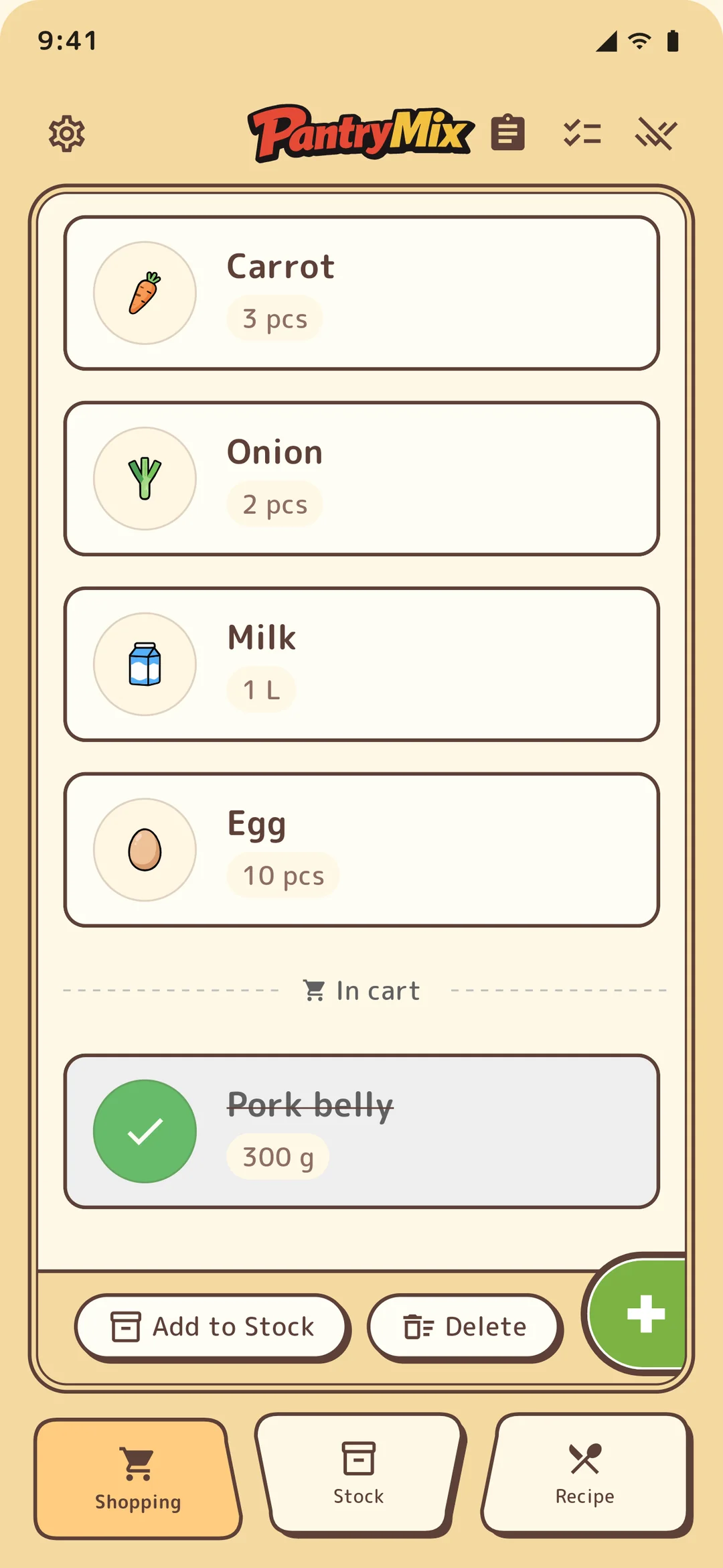
Even as a guest or free member, you can use the core shopping list. Add what you need, then move purchased items into stock with one tap to avoid buying duplicates.
Staples (like soy sauce or rice) are added to the shopping list automatically when stock drops below your threshold, so you forget less. All of this is free to start — only sharing with family requires the Family plan.
3How PantryMix helps
With the Family plan, members can share shopping lists, stock, and recipes. Everyone sees the same list, and checked items can be moved into stock after shopping.
This makes the list useful both at the store and when updating what is available at home.
4When to use shopping tasks
Use a shared list for items everyone can see. Use shopping tasks when you want to ask a specific person to buy something at a specific time.
Tasks can include a message and notification time, and Family plan members can assign them to another household member.
5Best fit
From a personal list when you live alone to sharing with roommates, couples, or family, PantryMix fits any household. It works well for weekly grocery runs, quick stops on the way home, and homes where more than one person shops.
Sharing with others requires the Family plan; your own shopping list is free to start.